
Step-by-Step Guide:
Step 1: Go to My Account > Contact Info.
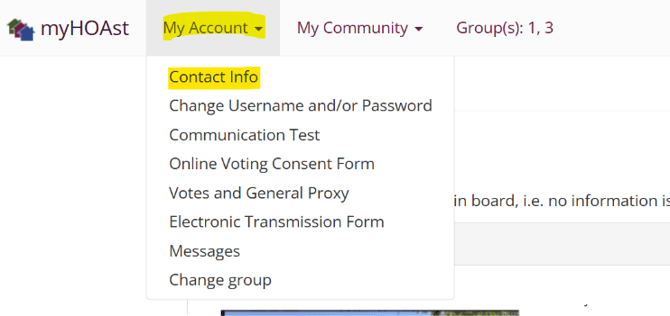
Step 2: From here, you can edit most details related to your account including:
- First, Middle, and Last Name (These cannot be updated automatically. If you attempt to update you name, then that request is created and an admin user can approve or deny the name change)
- Email Address
- Phone/Contact Information
- Mailing Address
Step 3: Once you are ready scroll down and click ‘Update User’
When You Can’t Update Your Information
In some cases, you may notice that certain fields cannot be edited. This happens when your association’s directory is managed in the CINC platform or another third-party database.
What to Do?
If you cannot update your information:
-
Contact your Property Manager or General Manager for your association.
-
Request the update directly with them.
-
Once the manager makes the change, it will automatically sync and be visible in MyHOAst within 24 hours.
💡 Need Help? If you experience issues or need further assistance, please contact our support team at: 📧 HOAstsupport@cincsystems.com