
💡Useful when:
- A property manager, assistant or board member is no longer part of the association.
Step-by-Step Guide:
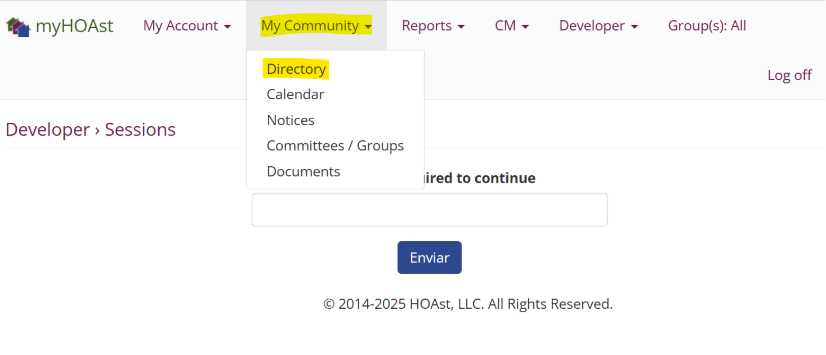
Step 1: Go to My Community > Directory.
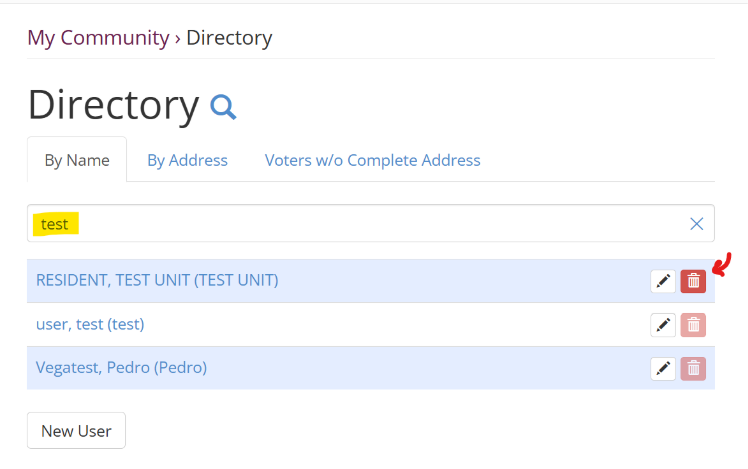
Step 2: Use the search bar to find the admin.
- Type their first name or last name (without spaces).
Step 3: Once you locate the admin, click the red trash bin icon next to their name.
Step 4: Click Confirm that will complete the action.
The admin will now be removed from the directory.
💡 Need Help?
If you experience issues or need additional assistance, please contact our support team at: 📧 HOAstsupport@cincsystems.com