
This guide is useful when:
- An owner wants to change their vote.
- An owner submitted both a paper proxy and an online vote and you are accepting the most recent submitted vote.
VIDEO TUTORIAL BELOW
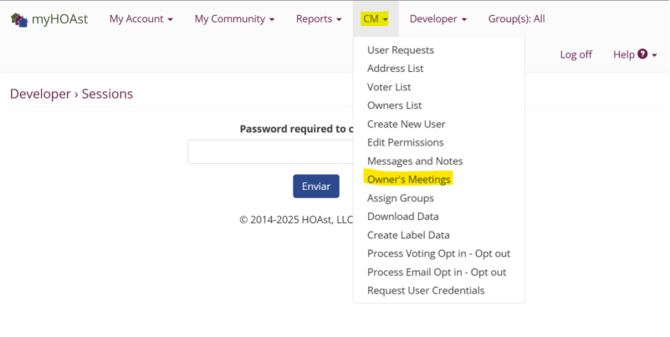
Step 1: Go to Owner Meetings
Go to CM > Owner Meetings.
Step 2: Select the Meeting
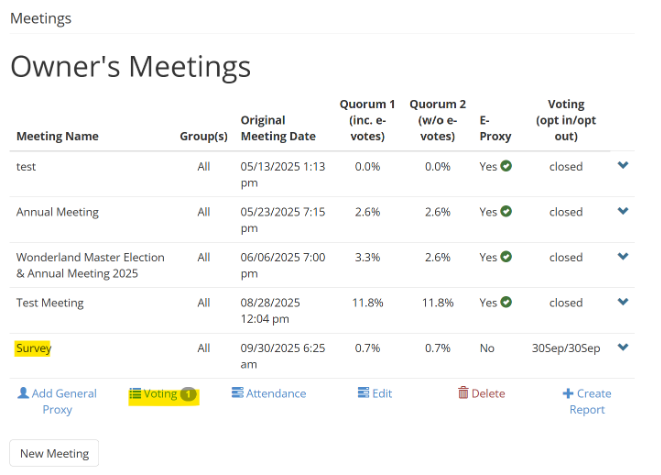
Click the required meeting.
- This will display a dropdown menu.
- Select “Voting.”
Step 3: Open Vote Details
The system will now display the details of the vote.
- Click “Record Meeting Vote(s).”
Step 4: Review the Vote List
You’ll see a list of:
- All non-electoral questions included in the vote.
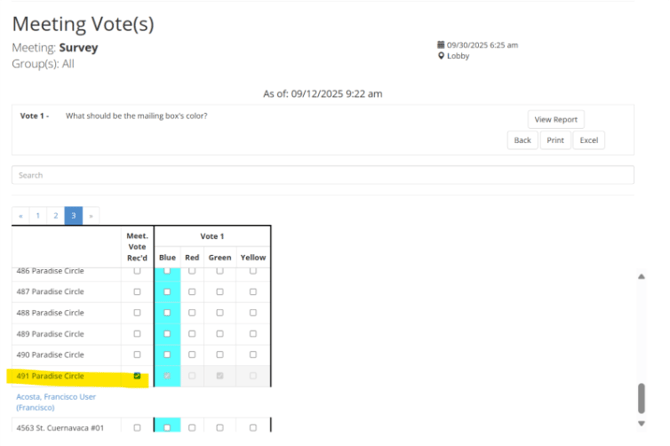
- All units in your association, with boxes showing if they voted and which option they selected.
Step 5: Invalidate the Vote
Locate the correct unit and user.
- Use the search box to search for the address or the voter’s last name to find their vote
- Uncheck the box next to the unit’s address.
- Click Confirm.
Step 6: Owner Re-Casts the Vote
The owner is now able to log in again and cast their new vote, or the admin user can record the voter’s new paper submission
💡 Important: This process applies only to non-electoral questions. Secret votes cannot be invalidated once submitted
📧 Need Help?
If you experience any issues or need additional assistance, please contact our support team at:
HOAstsupport@cincsystems.com