
VIDEO TUTORIAL BELOW
Step 1 – Log In and Access Voting Methods
- Log in to your association website.
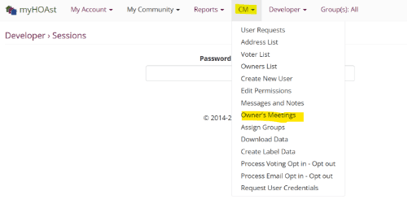
- Click CM at the top of the screen.
- Select Owners Meetings.
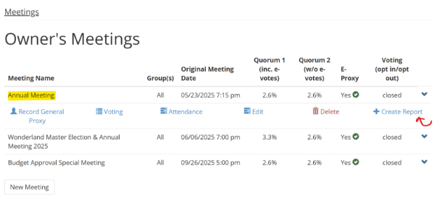
- Locate the ballot you want to report on (e.g., Annual Meeting).
Step 2 – Create the Report
- Click the method name to open the action menu.
- Select Create Report.
- Confirm the action.
- Wait a few seconds until the system confirms the report was created successfully.
Step 3 – Access the Report
-
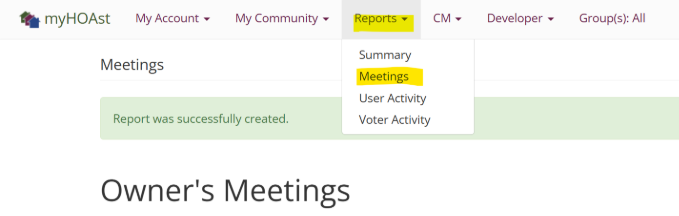
Go to Reports.
-
Select Meetings.
-
Find the meeting associated with the method you reported on.
-
Click the meeting title and choose Voting.
Step 4 – Review Electoral (Secret) Votes
Electoral votes display limited information to preserve secrecy.
From the vote screen, you can review:
- Total eligible units
- Quorum
- Vote weight
- Meeting and report details (date, location, title)
You may:
- Click Print to download a PDF tally report
- Select Addresses and Votes to view a list of participating units (without revealing selections)
- Print and share this list with board members if needed
Step 5 – Review Non-Electoral (Non-Secret) Votes
Non-electoral votes provide detailed visibility.
From Results, you can:
- View vote options and totals
- Print or export results
- Download detailed voting files showing:
- Address and unit number
- Number of votes
- Submission date
- Selected option
Additional options include:
- Addresses: View all units that participated
- View: Open a specific vote entry
- Print: Generate a full tally report
Step 6 – Confirm Totals and Participation
By reviewing results and printed tallies, you can:
- Confirm total votes cast
- Verify participation by unit
- Share accurate documentation with your association or board
This process allows you to confidently create reports, review voting activity, and export or print results for both secret and non-secret voting methods.
📧 Need Help?
If you encounter issues or need additional assistance, please contact our support team at: HOAstsupport@cincsystems.com