
Step-by-Step Guide:
Step 1: Go to CM and click on “Owner’s Meetings.”
Here you’ll see a list of all meetings your association has created.
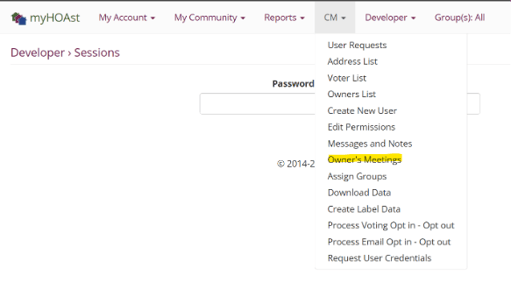
Step 2: Scroll down to the bottom of the list and click “New Meeting.”
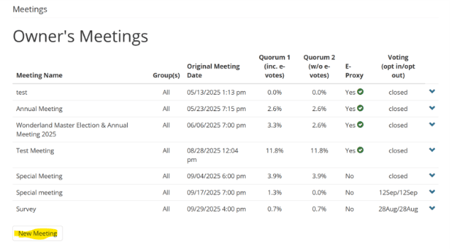
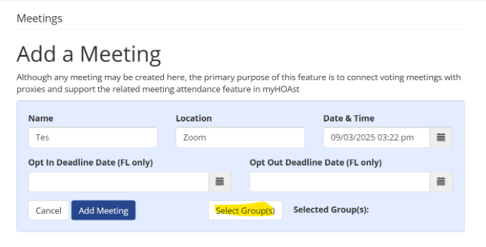
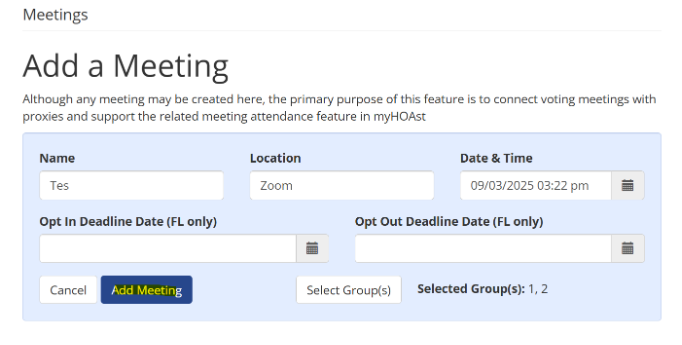
Step 3: Draft the meeting details by filling in the required fields:
- Name
- Location
- Date & Time
- And click “Select Groups”
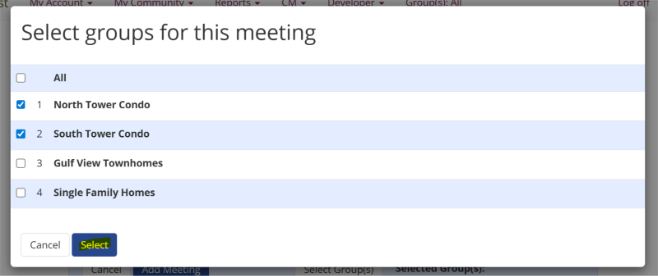
Step 4: When you click “Select Groups” a new menu will open.
- You can either select all groups or
- Check the boxes for the specific groups you want to include.
Once ready, click “Select.”
Step 5: Review your information and click “Add Meeting.”
Your new meeting will now appear in the list of association meetings.
➡️ Next Step: After creating the meeting, you can proceed with setting up your vote by following the “How to Set Up a Vote” guide.
💡 Need Help?
If you experience any issues or need additional assistance, please contact our support team at HOAstSupport@cincsystems.com