
⚠️ Important: If you’ve changed groups for an owner, you must also update the unit’s group. Otherwise, the owner will not be able to vote.
Step-by-Step Guide:
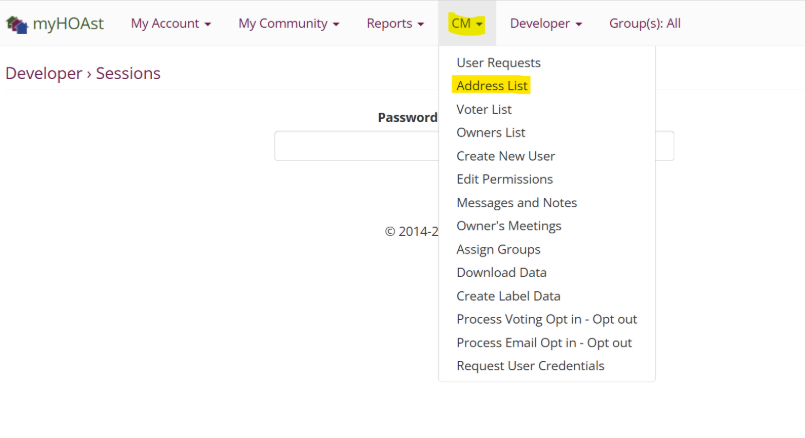
Step 1: Go to CM > Address List.
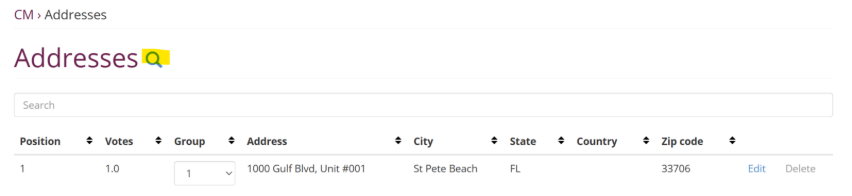
Step 2: Click the magnifying glass icon to open the search function.
Step 3: Type the unit number (without spaces) and press enter.
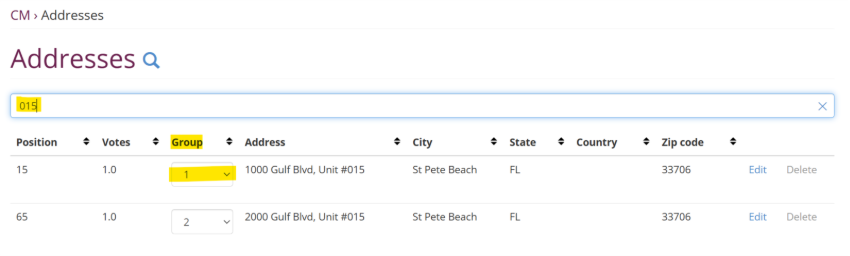
Step 4: Once you’ve verified the unit’s address, click Group.
- A dropdown menu will appear.
- Select the correct group for the unit.
Step 5: Advise the owner to log out and log back in to ensure the changes are reflected correctly.
💡 Need Help?
If you experience issues or need additional assistance, please contact our support team at:
📧 HOAstsupport@cincsystems.com