
💡 Why this matters:
The weight of a unit directly impacts both the quorum calculation and the results of votes in your association
Step-by-Step Guide:
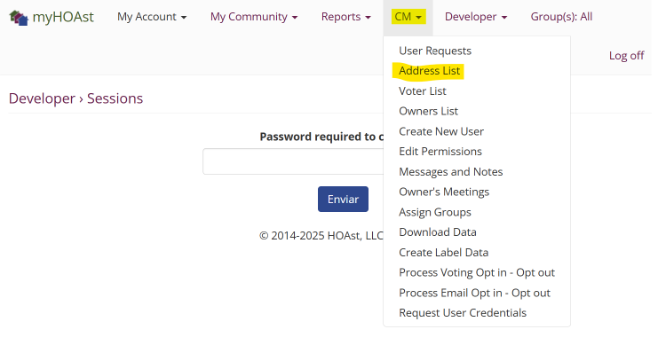
Step 1: Go to CM > Address List.
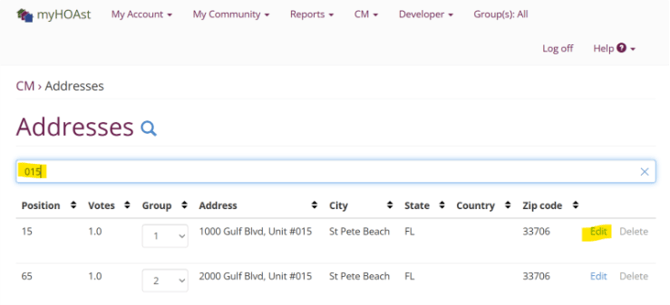
Step 2: Use the search bar to find the unit you want to update.
Step 3: Click Edit next to the unit’s details.
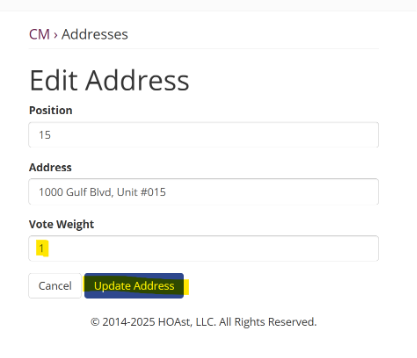
Step 4: Enter the correct vote weight in the designated field.
Step 5: Click Update User to save the changes.
💡 Reminder: The weight change will be applied for new votes. If a vote weight is changed, the unit must re-vote in order to have their new weight applied to the results.
📧 Need Help? If you experience issues or need additional assistance, please contact our support team at: HOAstsupport@cincsystems.com