
How Vote Weight Affects Quorum
For associations with weighted voting:
- Each unit contributes to quorum based on its assigned vote weight.
- When a unit submits an electronic vote or when a paper proxy is recorded, the quorum increases by that unit’s vote weight (e.g., 1.2, 0.75, 2.5, etc.) instead of the standard value of 1.
Example of Quorum Calculation
- If a unit with a vote weight of 1.2 participates in an association with 100 voting members, the quorum increases from 0% to 1.2%.
- As more units participate, the system adds up their respective vote weights.
How It’s Displayed
- The platform shows a combined quorum percentage, which includes both electronic votes and paper proxies.
- We do not separate electronic participation from paper participation; both are reflected in one total quorum calculation.
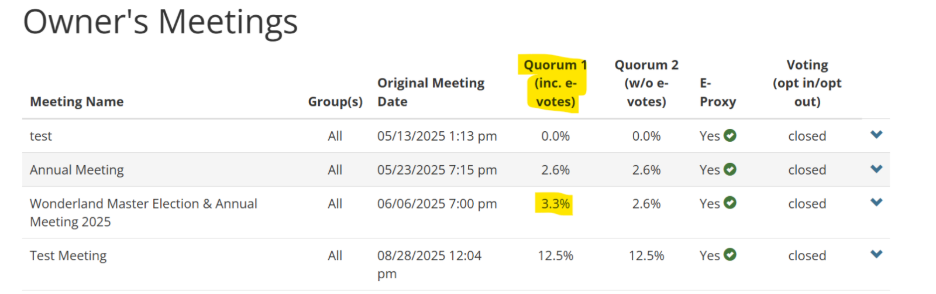
Quorum 1 ✅
- Represents total participation.
- It includes all electronic votes submitted plus any paper proxies recorded in the system.
- This is the combined quorum percentage that determines whether the association has reached the required quorum for the meeting.
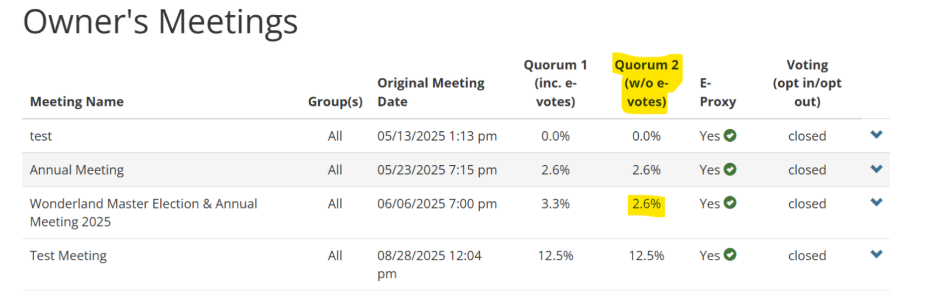
Quorum 2 📝
- Represents paper participation only.
- It reflects the percentage of ownership represented specifically through paper proxies recorded by the manager or admin.
- Useful for tracking how much of the quorum is made up of paper submissions vs electronic voting.
Key Takeaway
- Quorum 1 = Electronic Votes + Paper Proxies (total participation).
- Quorum 2 = Paper Proxies only.
When added together, they don’t exceed 100%, instead, Quorum 1 already includes Quorum 2, since it’s the combined participation total.
💡 Reminder: The quorum percentage displayed is always based on the ownership share that has participated, whether by electronic vote or recorded proxy.